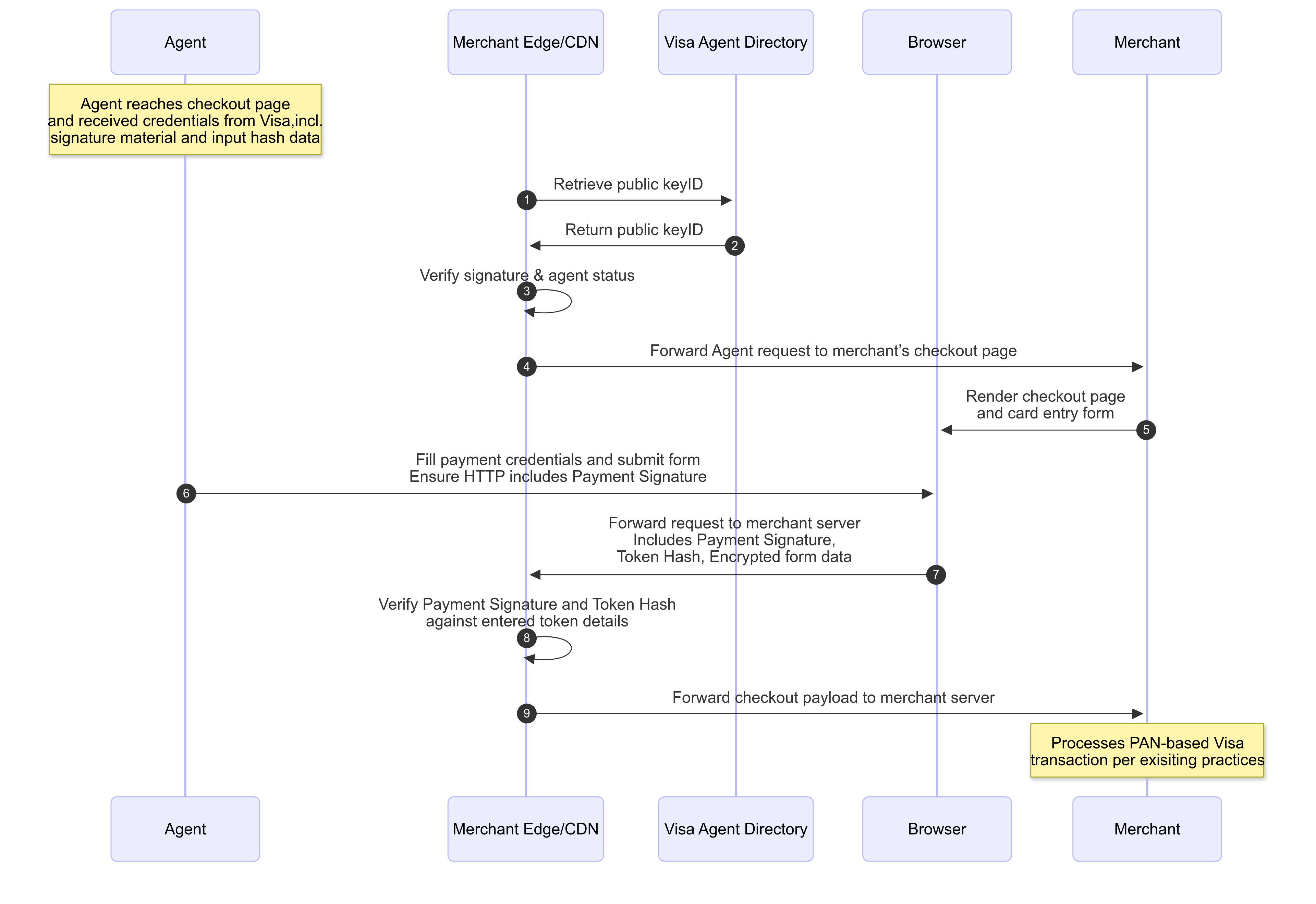
This page describes what a merchant checks under Visa's published TAP, with notes on where Visa CLI differs. If you only need to know that a Visa CLI agent signed an unpaid request, Verify a signed request is shorter. Per-endpoint detail is in the merchant verification reference.
Visa CLI's agents send no Consumer Recognition Object and no Payment Container. They send the signature, and they pay on Tempo. That's deliberate: a check tells you the agent was verified with a US Visa card, so a person is behind it, without telling you who, and those objects would carry the person's details. If you follow Visa's merchant specification, you'll see those objects only from agents whose integrator sends them, so treat them as optional and never require them from a Visa CLI agent.
TAP attaches verifiable intent to your existing web, API or message routes. The specification's /example-product and /checkout URLs are examples. TAP doesn't standardize a product catalog, a cart route, a checkout method or a single 402 response body, so you define those and validate the signatures that arrive.
Which interaction carries what
| Interaction | Signature tag | Data carried |
|---|---|---|
| Browsing or a product page | agent-browser-auth | An HTTP message signature. A consumer recognition object may accompany it |
| Purchase or payment | agent-payer-auth | An HTTP message signature plus a payment container. Consumer recognition data may also be present |
| Pay for access | Your 402 response and the paid retry | The container may carry a signed browsing IOU. Match it to your invoice, amount, recipient and resource |
Required recognition fields
| Field | Requirement |
|---|---|
Signature-Input | The list of signed components and parameters, with the same dictionary label as Signature |
Signature | The RFC 9421 byte-sequence value for that label |
@authority, @path | The minimum signed components in the TAP specification. Visa CLI's identity profile requires more |
created, expires | Epoch seconds, currently valid. The TAP merchant specification caps the duration at 480 seconds, and Visa CLI's identity profile at 60 |
keyid | The ID of the signing key, used to select the right trusted entry |
alg | The signature algorithm matching the public key |
nonce | A session and replay identifier, which links matching objects to the same message signature |
tag | agent-browser-auth or agent-payer-auth for the intended interaction |
A signed request
This is an illustration, with placeholder values. Generate your own timestamps and signatures.
GET /example-product HTTP/1.1
Host: shop.example.com
Signature-Input: sig2=("@authority" "@path");created=1793836800;expires=1793837100;keyid="YOUR_TRUSTED_KEY_ID";alg="ed25519";nonce="GENERATE_BASE64_NONCE";tag="agent-browser-auth"
Signature: sig2=:BASE64_SIGNATURE_BYTES:
The signature base
The signature base is the text that was signed. Its lines quote the component names, and its final line holds the Signature-Input member value, without the sig2 label:
"@authority": shop.example.com
"@path": /example-product
"@signature-params": ("@authority" "@path");created=1793836800;expires=1793837100;keyid="YOUR_TRUSTED_KEY_ID";alg="ed25519";nonce="GENERATE_BASE64_NONCE";tag="agent-browser-auth"
Verification order
- Recognize the profile. Require the right tag, fields and signed components for the interaction.
- Check time and replay. Validate the current interval and the profile's duration. Reserve the key and nonce pair after the signature verifies.
- Resolve a trusted key. Use the Visa Agent Directory or an issuer you've configured, match
keyidand algorithm, and refuse an unusable listing or an expired key when an expiry is given. The example verifier already does this: it refuses a key whoseexpirationDatehas passed, and answers couldn't check when the listing'sexpirationDateisn't a date. Visa CLI's registry sends the date the key's listing ends. - Rebuild the exact base. Use the component order you received and the raw signed parameters, and verify the signature. Verify
content-digestwhen it's signed. - Validate linked objects and payment. Check for a matching nonce and
kidon consumer and payment objects, then independently verify the payment credential, your challenge and settlement.
A key answer can be cached for up to 60 seconds, so a key revoked in that window can still pass. Payouts always make a fresh lookup. For other paid actions, choose by the stakes: where acting on a key revoked up to 60 seconds ago would matter, make a fresh lookup, or create the verifier with cacheSeconds: 0.
A verifier written for paid requests expects a payment credential, so it'll refuse every unpaid identity request as if the signature were missing. If you're checking identity on unpaid requests, follow Verify a signed request. If you're checking a paid request from a Visa CLI agent, the agent uses agent-payer-auth with Authorization: Payment, and you verify that credential through your Tempo payment integration before delivering anything. If your service then fails, the payment still stands: a delivery failure doesn't reverse it. The agent can resume with the same idempotency_key and isn't charged twice, but Visa never sends a signed credential again, so a retry won't reach you. Refund the agent yourself. To charge Visa CLI agents, see Pay with MPP.
If you find the relying-party handler in Visa CLI's verifier SDK, or a sample server built on it, that's the legacy x402 path, from before Visa CLI retired x402. Don't use it for a new paid endpoint. Verify the signature as described on this page and the payment through your Tempo payment integration.
Consumer recognition object
| Field | Meaning |
|---|---|
nonce | Links to the nonce in the HTTP message signature |
idToken | A JWT or JWS signed by Visa, verified separately using Visa's key |
contextualData | countryCode (ISO 3166-1 alpha-2), zip (up to 16 characters per the prose), ipAddress and deviceData |
kid | The same agent signing key identifier as the recognition header |
alg | The object signature's algorithm, matching that key |
signature | The signature of all object fields, in received order, except signature itself, as the merchant spec describes |
{
  "agenticConsumer": {
    "nonce": "SAME_NONCE_AS_HTTP_SIGNATURE",
    "idToken": "SIGNED_VISA_ID_TOKEN_JWT",
    "contextualData": {
      "countryCode": "US",
      "zip": "94107",
      "ipAddress": "203.0.113.10",
      "deviceData": {}
    },
    "kid": "SAME_AGENT_KEY_ID",
    "alg": "ALGORITHM_FOR_THE_SAME_KEY",
    "signature": "BASE64_OBJECT_SIGNATURE"
  }
}
The ID token
The ID token's own JWT header uses alg, kid and typ=JWT+ext.id_token. Unsigned alg=none isn't supported, and the prose prefers PS256 over RS256. Validate the trusted issuer, audience and time claims.
Public claims include iss, sub, aud, exp and iat, and optionally jti, auth_time and amr. Consumer claims include an obfuscated phone_number and email, verified flags, and optionally a masked phone_number_mask and email_mask. Matching a token to an existing customer takes your own mapping, because it doesn't reveal clear identities.
Agentic payment container
| Field or object | When it's present, and what for |
|---|---|
nonce, kid, alg, signature | Core binding and signature fields. The same signing key, and the matching HTTP nonce when a message signature is present |
cardMetadata | Guest checkout metadata: lastFour, paymentAccountReference, shortDescription and card display information |
credentialHash | A guest or key-entry credential hash. The prose names a 16-digit number, a 2-digit month and year and a 3-digit security code as inputs. Its exact hash encoding and algorithm aren't specified here |
payload | An encrypted credential object for API or protocol checkout, encrypted to your public key: token, expiry month and year, cardholderName, dynamicData, addresses and consumer contact and name fields |
If core fields are missing, the nonce doesn't match or the container's signature is invalid, you can't use the data for payment processing. You decrypt payload with the private encryption key you kept when you registered, and process the credential through your payment integration.
Browsing IOU
browsingIOU is a signed IOU sent after a 402, with invoiceId, amount, cardAcceptorId, acquirerId, uri, sequenceCounter, paymentService, kid, alg and signature. Compare it to your own challenge before you grant access.
Inconsistencies in the specification
Sources: TAP merchant specifications, HTTP Message Signatures, RFC 9421, Visa's example agent verification for payments, VDP encryption overview, VDP Message-Level Encryption.